Running an event already has enough moving parts: speakers, venues, sponsors, catering and attendees with questions. Registration shouldn't be another headache. Yet many organizers still rely on a Google Form, a shared spreadsheet, payment screenshots in chat and manual reminder messages.
A proper event website brings it all together: one place to learn about the event, register, pay and get reminders, with a clean list for your team.
I'm Aldrian, an independent developer. I build event websites, registration systems and calendars for conferences, workshops, seminars, trainings, churches, schools, associations and community groups.
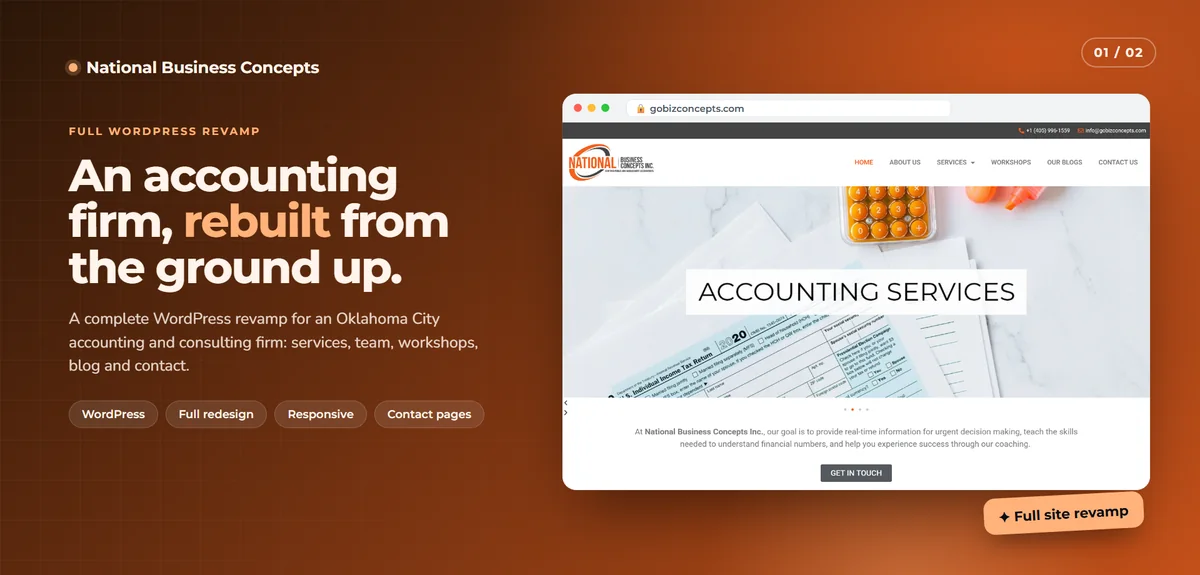
On the National Business Concepts website I rebuilt, workshops were one of the key sections, alongside services, team and blog, because educational events are a big part of how that firm reaches new clients.
What an event website includes
The event page
Title, date, time, venue or online link, what attendees will get, who it's for, the program and the price. Clear enough that someone can decide in a minute.
Speakers and program
Speaker profiles with photos and bios, plus a schedule that's easy to read on a phone and updates in one place.
Registration
A short form asking only what you need. Ticket types like early bird, regular, student or group. Capacity limits and waitlists. Promo codes if you use them.
Payments
Online payment through cards, GCash, Maya or bank transfer, depending on your payment provider, with automatic confirmation. More on GCash and Maya integration.
Confirmations and tickets
Instant confirmation emails with event details and, if you need them, tickets with QR codes for check-in.
Reminders
Automatic reminders before the event by email or SMS, with the venue, time, link and what to bring. More on automated notifications.
Venue and travel information
Maps, directions, parking, nearby hotels and accessibility details.
Sponsors and partners
Sponsor logos and pages, with tiers if needed.
Calendars for organizations with many events
Churches, schools, associations, training centers and venues often run events all year. An events calendar lets visitors:
- Browse upcoming events by month, list or category
- Filter by type, location or audience
- Add events to their own calendar
- Register for each event from its page
Your team can add events, set recurring schedules and update details from one admin area.
Check-in made easy
On the day, a simple check-in screen lets staff search attendees or scan QR codes from a phone. You see in real time who has arrived. After the event, you have accurate attendance numbers for reports and certificates.
After the event
- Thank-you emails with slides, recordings or resources
- Feedback surveys. See feedback systems.
- Certificates of attendance generated automatically
- Photo galleries and highlights for next year's promotion
Online and hybrid events
For webinars and hybrid events, registration can deliver private links to registered attendees only, send reminders with the link and track who joined. I integrate common video meeting and webinar tools rather than reinventing them.
Landing pages for big events
For conferences and launches with ad campaigns, a focused landing page with one clear call to action usually converts better than a general events page.
Built to handle the rush
Registration often opens with an announcement and a sudden spike of visitors. I build on fast hosting that handles spikes well and make sure capacity limits work correctly, so you never sell more seats than you have. My Ghostly app runs on the same kind of serverless platform, built for many people connecting at once.
Common mistakes with event registration
Long forms. Ask only what you need for this event.
Payment by screenshot. Manual checking is slow and error-prone.
No capacity control. Overselling is embarrassing and stressful.
No reminders. Many no-shows simply forgot.
Outdated past events. Old events shown as upcoming confuse visitors. Past events should be archived automatically.
Off-the-shelf or custom?
Event ticketing platforms work well for many events. A custom setup makes sense when you run events often, want registration on your own website with your branding, need integration with member records or want to avoid per-ticket fees. I'll help you decide.
Free events need structure too
Free events have their own problem: people register and don't show up. A few simple features help: confirmation emails that ask attendees to add the event to their calendar, reminders a day and an hour before, an easy way to cancel so seats free up for the waitlist and, for limited-seat events, a request to confirm attendance a few days before. Organizers often see much better turnout with these in place.
Reporting for organizers and sponsors
After the event, you'll want numbers: registrations, attendance, ticket types, where attendees came from and feedback scores. Sponsors often ask for these too. A simple report page gives you clean, accurate figures without stitching spreadsheets together.
What it usually costs
A single event page with registration and payment is a modest project. Full calendars with recurring events, ticket types, check-in and certificates take more work. You'll get a fixed quote after we talk.
How we'd work
- We talk about your events and how registration works today.
- I recommend a platform or custom setup.
- You get a quote with timeline and fixed price.
- I build and share preview links.
- We test registration, payments and emails.
- We launch, and I support you on event day if needed.
Let's make your next event easier
Tell me about your events. I'll reply with a plan and a fixed quote.