There are tens of thousands of WordPress plugins. Sometimes none of them do quite what you need. Or you need five plugins stacked together to fake one feature, and they conflict with each other. Or the plugin you rely on was abandoned and now breaks on newer PHP versions.
That's when a custom plugin makes sense.
I'm Aldrian, an independent developer in the Philippines. I build custom WordPress and WooCommerce plugins, extend existing ones and fix plugins that have stopped working.
A plugin I built and published
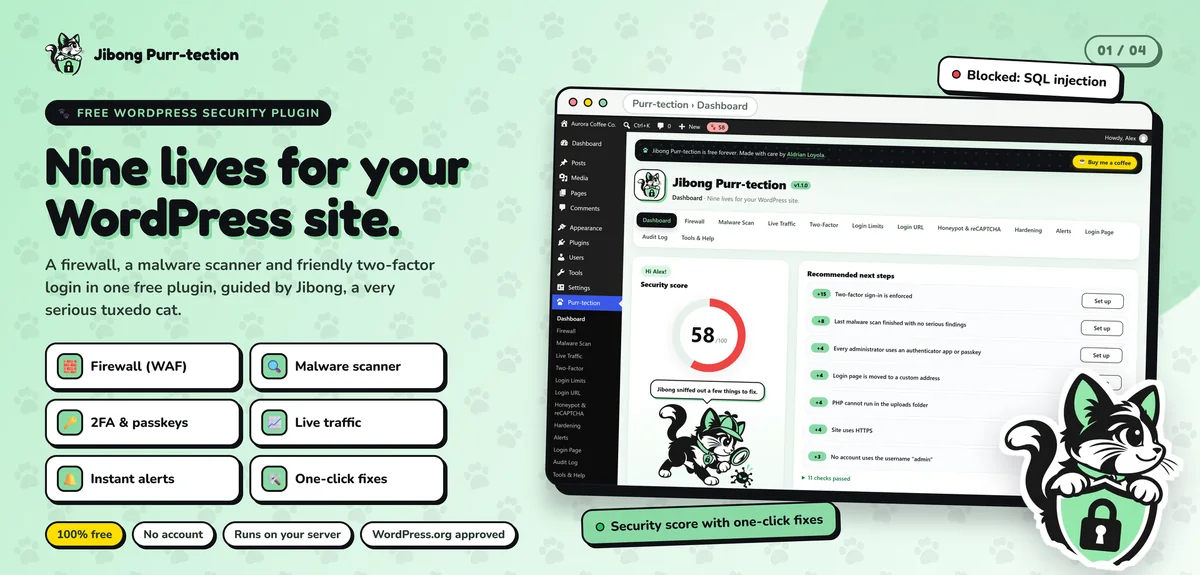
Jibong Purr-tection is my free WordPress security plugin, approved and listed in the official WordPress.org plugin directory. It combines:
- A web application firewall that checks every request as soon as plugins load, with a 7-day learning mode before it blocks anything
- A malware scanner that compares WordPress core and plugins with official WordPress.org checksums and scans other PHP files in small background steps
- Login security with two-factor sign-in by email code, authenticator app or passkey, plus brute-force protection
- A security score with one-click hardening, an audit log, live traffic and alerts
It's free forever, with no premium tier and no account, and everything runs on the user's own server.
Getting a plugin approved for WordPress.org means following strict guidelines on security, data handling and code quality. Every custom plugin I build for clients follows the same standards.
What custom plugins can do
Business-specific features
Custom booking rules, pricing logic, quote builders, member areas, internal dashboards, approval workflows, product configurators. Anything that's specific to how your business works.
WooCommerce extensions
Custom shipping rules, special discounts, product add-ons, wholesale pricing, order workflows, custom checkout fields, integrations with couriers, ERPs or inventory systems.
Integrations
Connect WordPress with CRMs, email marketing, payment gateways, accounting software, booking tools or your own APIs. More on API integration.
Custom blocks
Gutenberg blocks designed for your content, so editors can build pages consistently without a page builder.
Admin tools
Custom settings screens, reports, import and export tools and bulk actions for your team.
Replacing a stack of plugins
One well-built plugin can often replace several generic ones, reducing conflicts, updates and weight.
How I build plugins
Secure by default
- All input validated and sanitized
- All output escaped
- Database queries prepared
- Nonces and capability checks on every action
- No secrets in code
- Data stored only when needed
Update-safe
Built on WordPress hooks and APIs, not by editing core files or other plugins. Your custom plugin keeps working through WordPress, WooCommerce and theme updates.
Lightweight
Code and assets load only where they're needed, not on every page.
Compatible with modern PHP
Written for current PHP versions and tested on them.
Documented
Clear code, a README and notes on settings and hooks, so another developer can maintain it.
Version controlled
Every change tracked, so updates are clean and reversible.
Fixing and extending existing plugins
Sometimes you don't need something new. You need an existing plugin to behave differently, or to work again:
- Abandoned plugins that break on PHP 8
- Plugins that conflict with others
- Missing features in an otherwise good plugin
- Slow plugins that hurt performance
I extend plugins through their hooks where possible, rather than editing their files, so updates don't wipe out the changes. If a plugin is truly abandoned, I can fork it carefully or replace it. On Artic Flex, patching plugins for PHP 8.4 compatibility and replacing unmaintained ones was part of a safe upgrade on a live store.
Should this be a plugin or theme code?
A simple rule: if a feature should keep working when you change your theme, it belongs in a plugin. Custom post types, business logic, integrations and shortcodes all belong in plugins. Design belongs in the theme. Many sites I fix have business logic stuffed into the theme's functions.php, which causes trouble on every redesign.
Common mistakes with custom plugins
Editing other plugins directly. The next update erases your changes.
No security checks. Missing nonces and escaping are how plugins become attack paths.
Loading everything everywhere. Scripts and styles on every page slow the whole site.
Hard-coded values. IDs, URLs and keys baked into code break when anything changes.
No documentation. The next developer has to reverse-engineer everything.
Testing before it reaches your live site
Every plugin is developed and tested on a staging copy first, with realistic data. I check it against your current WordPress, WooCommerce and PHP versions, test it alongside your other plugins and confirm it doesn't slow the site down. Only then does it go live.
What it usually costs
It depends on the features, integrations and admin screens involved. Small plugins can be quick projects. Complex WooCommerce extensions and integrations take longer. You'll get a fixed quote after we define what the plugin needs to do.
How we'd work
- Tell me what you need the plugin to do.
- I write a short spec with features, screens and edge cases.
- You get a quote with timeline and fixed price.
- I build on staging and share progress.
- We test with real data and scenarios.
- I deploy and hand over the code and documentation.
Let's build exactly what you need
Tell me about the feature you need. I'll reply with questions and a fixed quote.