
Aldrian Online Safety Check (Chrome Extension)
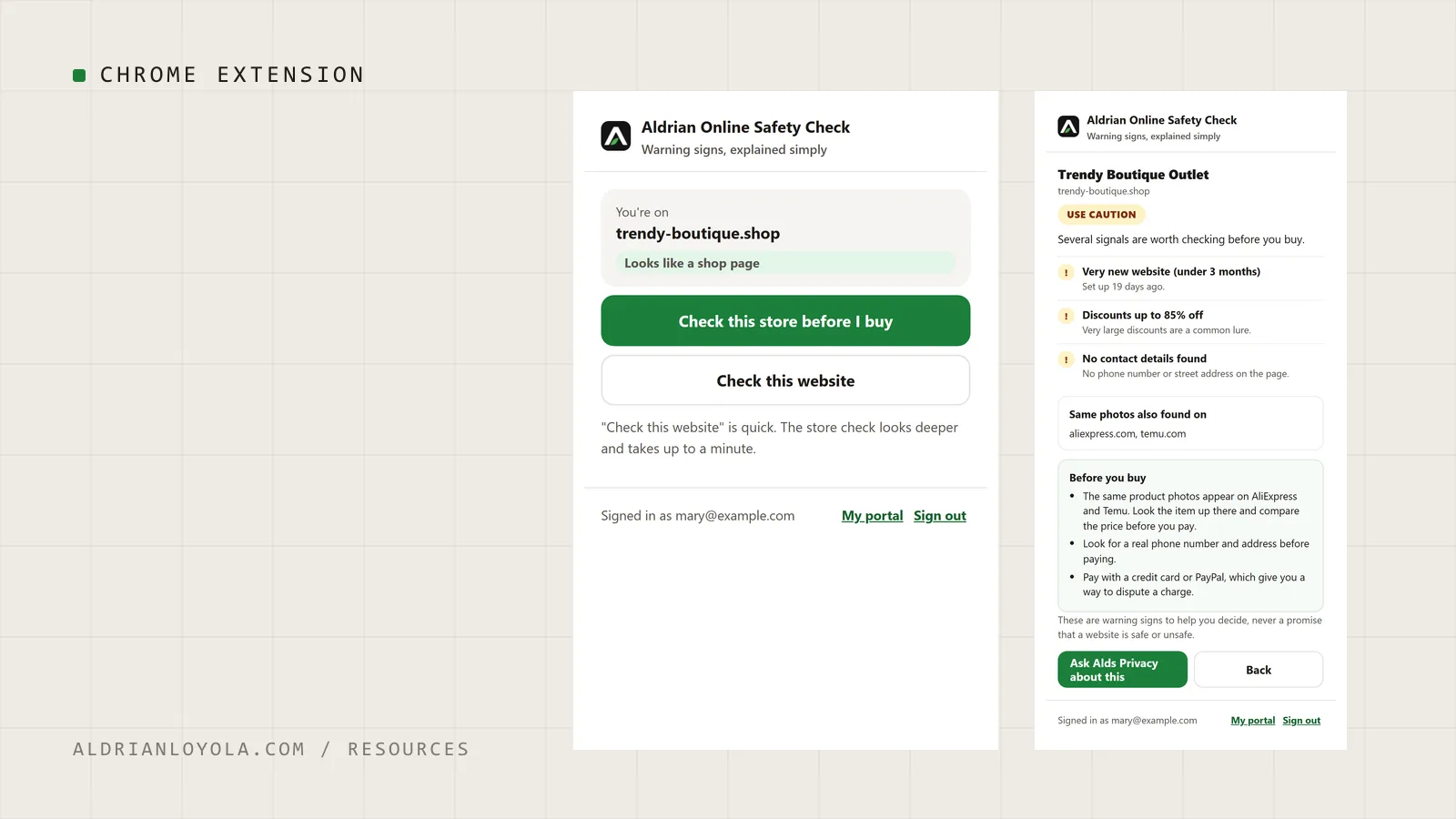
My Chrome extension for members of Aldrian Online Privacy Support. Press one button on any website to see its warning signs in plain words before you buy, sign in or share anything.
- Type
- Tool
- Version
- 1.2.0
- Requires
- Google Chrome and an Aldrian Online Privacy Support membership
- Updated
- Oct 22, 2026
Also by me
Aldrian Online Privacy Support
My own online safety membership. Members check stores, links and messages for warning signs, ask an AI assistant at any hour, and message me when something looks off.
- Chrome extension that checks a store before you buy
- Plain-language reports, no jargon
- A real person to ask
What it does
Aldrian Online Safety Check sits in your Chrome toolbar. When something about a website feels off, press the Aldrian button and it looks for the warning signs people usually miss:
- How new the website is. Many fake stores are only weeks old.
- Copied product photos. The same pictures showing up on other stores, often at a fraction of the price.
- Missing contact details. No phone number or street address anywhere on the page.
- Deep discounts and countdown timers. Common ways to rush you into paying.
You get a clear caution level, the reasons behind it, and what to do before you pay.
Check a link without opening it
Right-click any link and choose to check it. The link is looked up without you visiting the page, so you can see the warning signs first.
Private by design
The extension only looks at a page when you press its button. It never reads your browsing history.
How to get it
The extension is included with an Aldrian Online Privacy Support membership. Members install it from the Chrome Web Store and sign in with their member account.
Results are warning signs to help you decide, never a promise that a website is safe or unsafe. If anything worries you, members can ask me to take a closer look.
Need something built around this for your site?
Get in touchMore
Other tools
Google Snippet Preview Tool
Type a page title and meta description and see roughly how they could look in Google search results, with length checks and copy-ready meta tags.
Website Project Brief Template
A fill-in-the-blanks brief that helps you plan a new website or redesign, and get clearer, more accurate quotes from developers.