That $189 dress for $29.99 isn't really $29.99.
It's often a trap.
Here's the pattern behind those ads, what to do if you already bought something, and how I can help you check a store before you pay. No jargon, and no judgment.
Already paid? Jump to what to do now.
You scrolled past a beautiful ad. Then something felt off.
- The final charge didn't match the price on the ad.
- The item never showed up, or it looked nothing like the photo.
- The seller went quiet, or replied with copy-and-paste answers.
- You weren't sure if you even had a right to a refund.
- You felt embarrassed, even though it happens to careful, smart people every day.
These ads follow the same playbook every time.
Once you know the three steps, you start seeing them everywhere.
Step 1: The beautiful photo
A stunning, professional product image built to stop your scroll. The same photo is often reused across dozens of different "stores."
Step 2: The shocking price
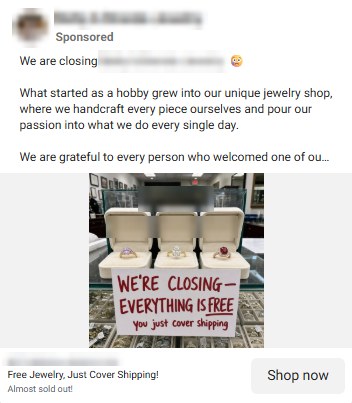
A made-up "original price" makes a cheap factory item look like a steal. Or it's "free," so you lower your guard.
Step 3: The checkout surprise
An unexpected fee appears, or what arrives looks nothing like the photo. By then, your card has already been charged.
Have you seen an ad like this?
Two real sponsored posts that use this exact pattern. I've blurred the store names: the point is the pattern, not the store.
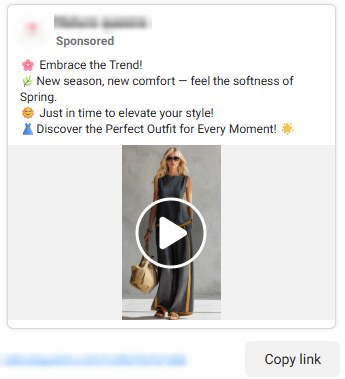
That "customer" in the video isn't real.
These three clips use AI-generated video to show a model wearing the product convincingly, even though no real person was filmed. It's a newer trick, and it works because it looks just real enough. The clips have no sound.
- Fabric that moves oddly, like it's floating or melting.
- Hands, jewelry and buttons that change shape between frames.
- Backgrounds that bend or shimmer as the model turns.
- Lighting that doesn't match: a face lit from one side, the room from another.
Don't panic. Here's what to do today.
Acting quickly matters, because card and PayPal disputes have deadlines.
- Save everything.Take screenshots of the ad, the product page, your order confirmation and any emails. Ads and stores can disappear overnight.
- Write to the store once, calmly.Ask for what you were promised, in writing. My Email Refund Helper can write this for you.
- If they don't fix it, call your card company or PayPal.Use the number on the back of your card. Ask about disputing the charge and whether they'd suggest a new card.
- Check for repeat charges.Look at your statement for small charges or a subscription you didn't sign up for.
- Ignore anyone who offers to "recover" your money for a fee.People who contact you promising refunds are very often the next trick.
I can't promise a refund or that money will come back, and I'm not a lawyer or bank. I'll help you understand your options and take the right next steps.
Meet me, and my AI helper.

I'm Aldrian, a real person.
Send me the ad, the link or a screenshot, and I'll take a careful look and tell you what I'd do. I'm available Daily, 8:00 AM – 5:00 PM ET, and I read everything sent after hours too.
- No judgment if you already clicked or paid
- Plain, everyday words
- Send a voice message if typing is a bother
Alds Privacy, my AI assistant, any time.
Ask a question at 2 in the morning and get calm, step-by-step help. It flags anything serious so I follow up myself.
- Talk instead of typing, and have answers read aloud
- Bigger text with one tap
- Never asks for your passwords or card numbers
Seven tools that do the checking for you.
Each one shows what it looked at and the warning signs it found, in plain words.
Online Shop Protect
Paste a store's address. See how new the website is, reports about it, and whether its photos are copied.
Link Check
Check a link from an ad, text or email without opening it.
Scan Product
Add a photo or link and the price. Spot fake markdowns and photos found on bargain sites.
Message Check
Paste a text or add a screenshot. See the red flags and what to do.
Email Refund Helper
Tell it what went wrong. It writes a calm, clear email to the store.
Data Breach Check
See if your email showed up in a known data breach, and what to change.
Privacy Checkup
A short quiz with a score and a simple to-do list.
Try one free
Check a link right now with my free Link Check. No sign-up needed.
One small monthly fee. A real person in your corner.
For less than one "too good to be true" order, you get me, Alds Privacy and all seven tools, whenever something online doesn't look right.
- Check stores, links and ads before you pay
- Help with what to do if you already paid
- Cancel any time, right from your account
Questions first?
Common questions
Do I need to be good with computers?
Not at all. If you can send a text, you can use this. You can even send me a voice message instead of typing, and have answers read out loud.
Can you get my money back?
I can't promise that, and nobody honest can. What I can do is help you act quickly and correctly, which gives you the best chance with your card company or PayPal.
Will you tell me if a store is a scam?
I'll show you the warning signs I find and what I'd do in your place. I don't label stores as definitely safe or definitely fake, because the honest answer is usually "here's what to watch out for."
Is this a subscription?
Yes, $9.99 a month. You can cancel any time from your account and keep access until the end of the month you've paid for.